


Lightroom Desktop vs Mobile Editing
The Complete Comparison Guide for Photographers
The evolution of photo editing has reached a fascinating crossroads where powerful desktop software meets the convenience of mobile technology. Adobe Lightroom, the industry standard for photo organization and editing, now exists in two distinct yet connected forms: the robust Desktop version and the streamlined Mobile app. Understanding the strengths, limitations, and ideal use cases for each platform will revolutionize how you approach photo editing, whether you're a professional photographer managing thousands of images or an enthusiast wanting to edit on the go.
This comprehensive guide breaks down everything you need to know about Lightroom Desktop and Mobile, helping you choose the right platform for your needs and master the art of seamless cross-device editing. By the end, you'll understand exactly how to leverage both versions to create an efficient, flexible workflow that adapts to your lifestyle and creative demands.
Understanding the Lightroom Ecosystem
Before diving into specific features, it's essential to understand how Adobe has structured the Lightroom family. The ecosystem consists of Lightroom Classic (the traditional desktop powerhouse), Lightroom CC (the cloud-based desktop version), and Lightroom Mobile (available for iOS, Android, and tablets). Each serves different needs while maintaining enough common ground to work together harmoniously.
Think of Lightroom Desktop as your digital darkroom - a comprehensive workspace where you have every tool imaginable at your fingertips. It's where serious editing happens, where you can manage massive photo libraries, and where you have the processing power to handle complex adjustments on RAW files without compromise.
Lightroom Mobile, on the other hand, is like carrying a portable studio in your pocket. It brings professional-grade editing capabilities to your phone or tablet, allowing you to work anywhere inspiration strikes. While it may not have every single feature of its desktop counterpart, it offers surprising depth and continues to grow more powerful with each update.
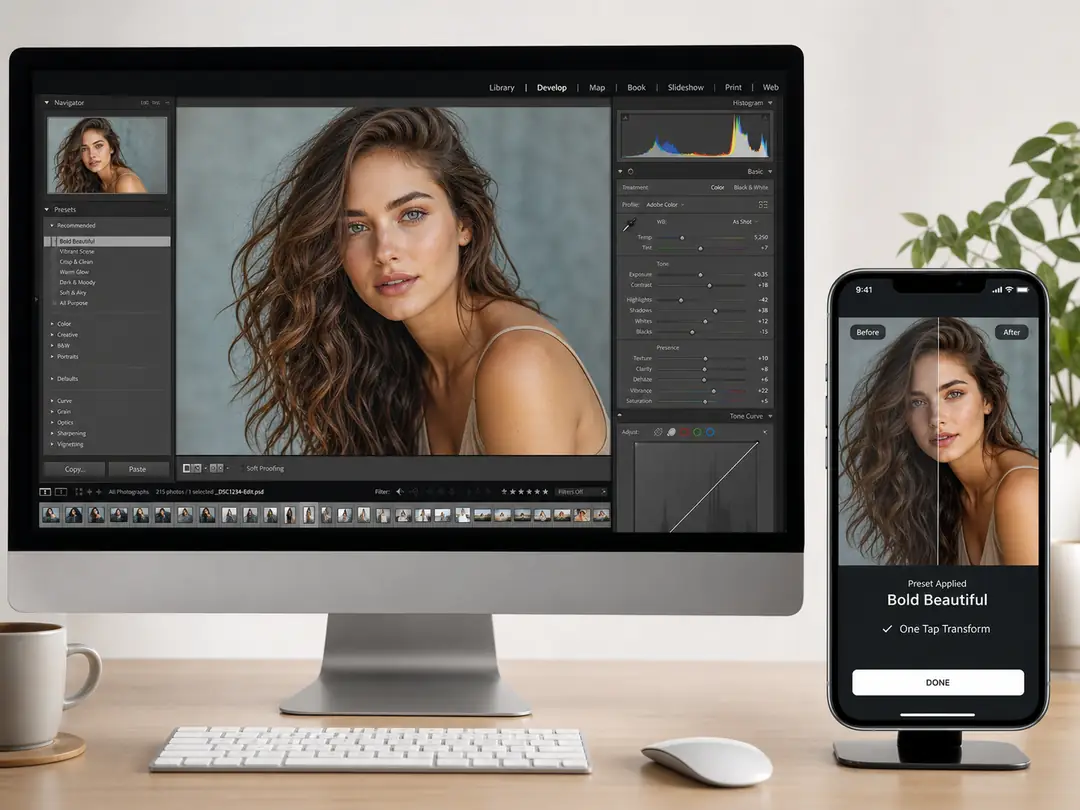
Feature Comparison: Desktop Power vs Mobile Flexibility
Editing Tools and Capabilities
Lightroom Desktop provides the complete arsenal of editing tools photographers have come to expect. You have access to advanced features like luminosity masking, color grading with multiple color wheels, detailed tone curve adjustments with individual RGB channels, and sophisticated lens corrections. The desktop version excels at batch processing, allowing you to sync edits across hundreds or thousands of photos simultaneously.
When color accuracy is paramount—like bringing out the true brilliance in macro shots with our [EverPixel Jewelry Presets]—Desktop's advanced color grading wheels give you pinpoint control. The desktop interface spreads these tools across panels that you can customize, dock, and arrange according to your workflow.
Lightroom Mobile takes a different approach, focusing on touch-optimized controls that feel natural on smaller screens. While it includes most essential editing tools, the implementation is designed for finger gestures rather than mouse precision. You'll find the same powerful features like selective adjustments, gradient filters, and even the ability to apply premium assets. For instance, capturing delicate skin tones during a session is crucial; applying a specialized [EverPixel Newborn Preset] as a starting point on mobile gives you an instant, professional base before you even reach your computer.
File Management and Organization
Desktop Lightroom shines when it comes to managing large photo libraries. The catalog system in Lightroom Classic can handle millions of images without breaking a sweat. You have sophisticated organizational tools including hierarchical keyword structures, smart collections, and color labels that work together to create complex systems tailored to your needs.
Mobile Lightroom takes a simpler approach to organization, relying primarily on albums and basic search functions. This simplicity is actually an advantage for many users - it forces you to focus on editing rather than endlessly organizing. Photos shot within Lightroom Mobile's professional-grade camera automatically sync to your desktop catalog, creating a seamless capture-to-edit workflow.
Workflow Scenarios: Choosing the Right Tool for the Job
Professional Studio Workflow
For photographers managing client work, events, or large commercial projects, Desktop Lightroom remains indispensable. Consider a real estate photographer dealing with tricky mixed lighting. Utilizing professional tools like the [EverPixel Real Estate Preset Collection] allows you to sync complex white balance and exposure corrections across an entire property portfolio in seconds on Desktop, ensuring a consistent, high-end look that sells properties faster.
Travel and Street Photography
This is where the mobile-desktop combination truly shines. Imagine you're exploring a new city, capturing street scenes and architectural details. Instead of waiting until you return home, you can import them to Lightroom Mobile during lunch, apply your favorite film-inspired looks, and share selects on social media instantly.

Syncing Between Devices: Creating a Seamless Workflow
The true power of modern Lightroom lies not in choosing between desktop or mobile, but in using them together as a unified system. When you import photos to Lightroom CC or Mobile, full-resolution files upload to Adobe's cloud storage. This process happens in the background, with smart previews allowing you to edit immediately.
For Classic Users, creating smart collections that automatically sync photos matching certain criteria (like five-star ratings) keeps your mobile library fresh and relevant without manual management. The most recent edit typically takes precedence, but the system handles conflicts gracefully when they occur.
The Hybrid Approach: Best of Both Worlds
Most serious photographers benefit from using both platforms strategically. Capture and initial selects happen on location using mobile. Quick edits for social media or client previews get done immediately. Back at your workstation, refined edits using desktop's full power tools perfect your best images. The sync system means you never have to manually transfer files or redo work.
Conclusion: Embracing the Connected Photography Ecosystem
The question isn't whether to choose Lightroom Desktop or Mobile - it's how to leverage both platforms to enhance your photography. Desktop remains the powerhouse for serious editing and large-scale management, while mobile brings unprecedented flexibility and immediacy to the editing process.
By understanding these strengths and building workflows that leverage them appropriately, you'll edit more efficiently, share more quickly, and ultimately spend more time doing what matters most: creating compelling photographs.
Ready to elevate your editing workflow?
Stop wasting hours tweaking sliders. Explore EverPixel's collection of premium, studio-tested Lightroom presets designed to deliver "Real Tones, Real Results" for both Desktop and Mobile.
Shop All Presets